 Eric Sommers
1 min read
Cisco Catalyst 9300 Configuration Guide
 Eric Sommers : 04.10.2025
Setup, Stacking, Passwords, and Troubleshooting When you’re rolling out a network built for speed, scale, and rock-solid reliability, Cisco’s...

Interested in adding Catalyst switches to the Meraki Dashboard?
Good news! All Cisco Catalyst 9200, C9200L, 9300, C9300L, C9300X, and C9500 High Performance (only the 100G-uplink models: 48Y4C, 24Y4C, 32C, 32QC) switches can be migrated into the Meraki Dashboard and run as cloud-managed switches, provided they are on a supported full-encryption IOS XE image (minimums vary by family, from 17.15 to 17.18 or later), in install mode, with no unsupported network modules installed. The migration moves the switch into Meraki cloud operating mode, which erases the local configuration and makes the console read-only. Below is exactly which models qualify, what software they need, and the commands to do it.
Meraki and Catalyst are not feature-equivalent, and there are real tradeoffs in performance, flexibility, scalability, and compatibility worth understanding before you commit to a platform. First, physical stacking of Meraki is different than stacking Catalyst. Like Catalyst, physical stacks with Meraki are only allowed within the same series or family of switches, such as 9300s can only stack with 9300s and MS225s can only stack with MS225s. The issue is the Meraki lines are seperated by certain capabilities such as UPoE or Multi-gig ports. If you want to add multi-gig ports to a stack of Catalyst 9300s, thats no problem. If you want to add multi-gig ports to a stack of MS225s, you can't. You would have to add a different platform like the MS355, which is twice the cost of a data-only MS225. StackPower isn't an option until the MS390. Physical stack throughput maxed at 100G until the MS390, and the components used in the MS390 are the same as the C9300. There are other quirks, such as the QSFP28 ports on Meraki switches not supporting 40G, when every other QSFP28 port in Catalyst is 40/100G.
Speaking of multi-gig ports: as of 2026, there isn't a commercial access point that doesn't have at least a 2.5G network interface. Any newly purchased access point plugged into a non multi-gig switch is a bottleneck. 2.5G, 5G, and 10G interfaces are now the norm for access points. Read more here: New mGig more of a "meh" gig?
Another quick aside: if you want these APs to function without restrictions, UPoE is now the minimum standard. Read more here: Do You Need UPoE?
Interested in marrying Catalyst hardware and Meraki management? Let's do it.
C9200L, C9200, C9200CX, C9300 (including the C9300L and C9300X variants), and C9500 High Performance (48Y4C, 24Y4C, 32C, 32QC) can be migrated to Meraki. This includes stand-alone switches and stacks. During conversion, the switch is moved into Meraki cloud operating mode. Local configuration is erased, console access (or CLI) becomes read-only, and configuration is managed from the Meraki Dashboard. CLI show-commands are available through the Dashboard, but troubleshooting is limited if you know CLI well.
During the migration process, the switch flash, configuration, USB-flash, and all storage will be formatted.
There is a less destructive option. The flow in this article is cloud management with configuration source: cloud, where the Dashboard owns the config and the local config is erased. Cisco also offers configuration source: device (the evolution of Cloud Monitoring), where your configuration stays on the switch, you keep read and write CLI access, and the Dashboard is used for monitoring and troubleshooting. If wiping a production switch sounds wrong for your situation, read the companion guide before you proceed.
During the migration process, the switches flash, configuration, USB-flash, and all storage will be formatted.

The following models can be managed via Meraki with cloud configuration. Verify the exact model against Cisco's supported-model table before proceeding, since an unsupported model can be bricked.
| Family | Models | Minimum IOS XE (cloud config) |
|---|---|---|
| C9200L | C9200L-24T-4X, C9200L-24P-4X, C9200L-48T-4X, C9200L-48P-4X, C9200L-48PL-4X, C9200L-24PXG-4X, C9200L-48PXG-4X, C9200L-24PXG-2Y, C9200L-48PXG-2Y, C9200L-24T-4G, C9200L-24P-4G, C9200L-48T-4G, C9200L-48P-4G, C9200L-48PL-4G | 17.15+ |
| C9200 | C9200-24T, C9200-24P, C9200-24PB, C9200-24PXG, C9200-48T, C9200-48P, C9200-48PL, C9200-48PB, C9200-48PXG | 17.18+ |
| C9200CX | C9200CX-12T-2X2G, C9200CX-12P-2X2G, C9200CX-8P-2X2G, C9200CX-8UXG-2X, C9200CX-12P-2XGH, C9200CX-8P-2XGH, C9200CX-8UXG-2XH | 17.18+ |
| C9200CX (8PT) | C9200CX-8PT-2G | 26.1.1+ |
| C9300 (main, non-L) | C9300-24T, C9300-24P, C9300-24U, C9300-24UX, C9300-48T, C9300-48P, C9300-48U, C9300-48UXM, C9300-48UN, C9300-24S, C9300-48S, C9300X-12Y, C9300X-24Y, C9300X-48HXN, C9300X-24HX, C9300X-48HX, C9300X-48TX (and the matching -M SKUs) | 17.15+ |
| C9300L (all variants) * | C9300L-24P-4X, C9300L-24T-4X, C9300L-24UXG-4X, C9300L-48P-4X, C9300L-48PF-4X, C9300L-48T-4X, C9300L-48UXG-4X, C9300L-24T-4G, C9300L-48T-4G, C9300L-24P-4G, C9300L-48P-4G, C9300L-48PF-4G, C9300L-24UXG-2Q, C9300L-48UXG-2Q | 17.18.1+ (see advisory) |
| C9300 (remaining, non-L) | C9300-24UB, C9300-24UXB, C9300-48UB, C9300-24H, C9300-48H, C9300LM-48UX-4Y, C9300LM-48U-4Y, C9300LM-24U-4Y, C9300LM-48T-4Y | 17.18+ |
| C9500 High Performance | C9500-48Y4C, C9500-24Y4C, C9500-32C, C9500-32QC | 17.18+ |
* C9300L firmware advisory: due to a known issue, C9300L (and C9300L-M) switches will not upgrade to 17.15.4 from CS firmware. A network scheduled to move to 17.15.4 will upgrade every other model and leave the C9300L on its current CS version until the issue is patched. Do not target 17.15.4 for C9300L. Use a different supported release such as 17.18.1+, and check Cisco's release advisory for the latest patched 17.15 maintenance build before scheduling. (C9300LM is a separate model line and is not affected.)
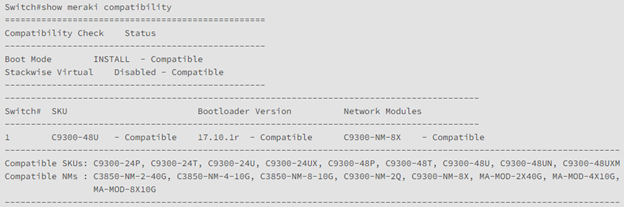
The following network modules are supported. If a switch has a module that is not on the current supported list, migration will fail, so verify against Cisco's current network-module matrix first. Some modules also carry their own minimum firmware (for example, the C9300X-NM-2C operates at 40G on CS17 but needs 17.15+ for 100G).
Migration WILL NOT succeed if an incompatible network module is present.
Software updates work just like Meraki cloud works today, although Cisco officially calls them "Firmware Upgrades." You can see all firmware versions and schedule upgrades on a per-network or per-device-type basis. More on that process here: Managing Firmware Upgrades
On Meraki-managed C9300 and MS390 switches, Network-Based Application Recognition (NBAR and NBAR2), NetFlow v10 (IPFIX) for IPv4 and IPv6 traffic, and Encrypted Traffic Analytics (ETA) are supported. On Cloud Management with IOS XE, ETA is available from 17.15. MS NetFlow and Encrypted Traffic Analytics
A note before you start: a downgrade back to CS firmware from Cloud Management with IOS XE is restricted. Treat the move to cloud configuration as a one-way path for production gear as you wont be able to roll-back without engaging Meraki support.
To migrate, the switch must be running a supported IOS XE release, in install mode, using a full-encryption image. Minimum versions vary by model family, so verify the exact model against Meraki's supported-model table and run show meraki compatibility before proceeding.
And without further ado, please follow these steps to move your Catalyst from IOS-XE to the Meraki cloud.

*Front facing ports only. The management port Gig0/0 on the back of the switch will not work.
*SVIs only, no routed port support
Required before registration:
- SVI with IP connectivity to the internet
- Default route or next-hop toward the internet
- DNS server capable of resolving dashboard.meraki.com
- ip http client source-interface pointing to the internet-facing SVI
If you can ping dashboard.meraki.com, you're good to go!
3. Begin the registration process
The system will connect to the Meraki cloud and register the newly added switch, producing a Meraki MAC and a Cloud ID. The Cloud ID is a 12-digit alphanumeric number that looks like a Meraki serial number.
Switch#en
Switch#config t
Switch(config)#service meraki connect
*Dec 9 22:26:34.207: %MERAKI-5-DEVICE_REGISTER_START: Starting to register Switch 1
*Dec 9 22:26:48.001: %MERAKI-5-DNS_LOOKUP_SUCCESS: Resolved catalyst.meraki.com to 158.115.131.188
Switch 1 has been successfully registered
Meraki MAC: 549xxxxxxx
Cloud ID: Q5UL-xxxx-xxxx
*Dec 9 22:26:49.541: %MERAKI-5-CONNECT_TO_DASHBOARD_SUCCESS: Successfully connected to Meraki Dashboard
*Dec 9 22:26:50.556: %MERAKI-5-SWITCH_REGISTER_SUCCESS: Switch 1 has been succesfully registered.
*Dec 9 22:26:50.556: %MERAKI-5-MAC_ADDR: Meraki MAC: 549xxxxxxx
*Dec 9 22:26:50.556: %MERAKI-5-CLOUD_ID: Cloud ID: Q5UL-xxxx-xxxx
Device Registration Status:
---------------------------
Switch Serial Migration
Num PID Number Cloud ID Mac Address Status Mode
-----------------------------------------------------------------------------------------------
1 C9200L-24P-4G JAExxxxxxx Q5UL-xxxx-xxxx 549f.c6ba.f600 Registered C9K-M [Monitoring]
4. Please copy the Cloud ID as that is required for claiming it in Meraki Dashboard.
If registering a stack, each switch will be assigned a unique Meraki ID. You will need this ID to add the device to your Meraki network. CLI feedback will list the switches Cisco part IDs, serials, Meraki IDs, MAC addresses, its migration status, and its operating mode. You’re looking for a migration status of ‘Registered’ and an operating mode of ‘C9K-M'.
Before proceeding, please remember that all local files or any attached USB storage devices will be wiped clean.
This command will begin a factory reset as well as disable CLI although console feedback will continue allowing you to monitor the process. We’ve seen devices take as much as 15 minutes to reset and boot in the Meraki managed deployment. 'Sho meraki connect' will bring up the connection details. Once you have "Config fetch succeeded" as the Fetch State, you can claim the device in your Meraki dashboard!
Switch#sho meraki connect
Service meraki connect: enable
Meraki Tunnel Config
------------------------------------
Fetch State: Config fetch succeeded
Fetch Fail:
Last Fetch(UTC): 2025-12-09 22:27:07
Next Fetch(UTC): 2025-12-09 23:44:39
Config Server: cs1-2037.meraki.com
Primary: usw.nt.meraki.com
Secondary: use.nt.meraki.com
Client IPv6 Addr: FD0A:9B09:1F7:1:569F:C6FF:FEBA:F600
Network Name: meraki admin network - wireless
And that’s it!
Hop into your Meraki dashboard:
5. Organization > Inventory, then "claim"
6. Add the switch to a network.
After the device has been added to a network, conversion to Meraki cloud operating mode will begin. This initiates a factory reset on the switch and restricts console access to read-only. The switch may take up to 15 minutes to reset. DO NOT power cycle the switch(es).
To convert your switch back to a non-Meraki managed switch, please contact Meraki support.
Which Cisco Catalyst switches can be managed in the Meraki Dashboard? With cloud configuration, the supported families are C9200L, C9200, C9200CX, C9300 (including the C9300L and C9300X variants), and C9500 High Performance. The C9000 Smart Switches (C9350, C9610, C9550) are supported too, but they onboard through a different path covered in the companion guide.
What IOS XE version is required to migrate a Catalyst switch to Meraki? Minimums vary by family. C9200L and the main C9300 group start at 17.15, while C9200, C9200CX, the remaining C9300 models, and C9500 High Performance start at 17.18. Run show meraki compatibility and verify the exact model first.
Does migrating a Catalyst switch to Meraki erase its configuration? In cloud configuration mode, yes. The local configuration is erased, flash and attached USB storage are formatted, and the console becomes read-only. Device configuration mode preserves the local config.
Can a Meraki-managed Catalyst switch be converted back to IOS XE? Yes, but it is not self-service, and downgrading from Cloud Management with IOS XE to CS firmware is restricted. Contact Meraki support, and expect a possible factory reset.
What happens to USB storage during migration? All local files and attached USB storage are wiped. Disconnect USB storage before migrating, since it is not accessible in Meraki cloud operating mode.
Do network modules affect Meraki migration compatibility? Yes. Only specific network modules are supported. If an unsupported module is installed, the migration fails, so remove or replace it first.


1 min read
Eric Sommers : 04.10.2025
Setup, Stacking, Passwords, and Troubleshooting When you’re rolling out a network built for speed, scale, and rock-solid reliability, Cisco’s...

1 min read
Eric Sommers : 02.18.2026
Is Catalyst Center for Access-Layer Switches Worth It? The short answer: Access-layer switches don't benefit from Catalyst Center the way core and...

1 min read
Eric Sommers : 12.01.2025
What an explosion we’ve seen with Artificial Intelligence (AI)! My initial scope for this article was to explain how AI works for network management...